
Sponsor Edit Controls
Purpose
This guide provides instructions for State Agency users to manage the global windows during which Sponsors and SFAs are permitted to edit various sections of their applications and claims.
Step-by-Step Instructions
Managing Edit Access Dates
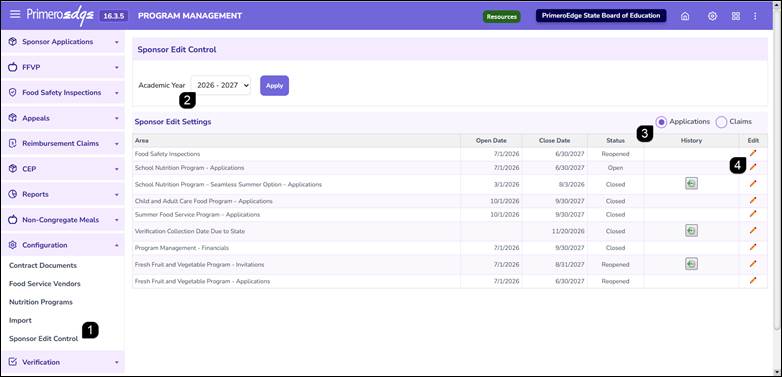
- Navigate to the Program Management module > Configuration > Sponsor Edit Controls page.
- Select the applicable Academic Year from the dropdown and click Apply.
- In the Sponsor Edit Settings table, choose the appropriate radio button for either Application or Claims.
- Review the current Open Date and Close Date for each area. To modify access, click the Pencil icon in the Edit column for the relevant area.
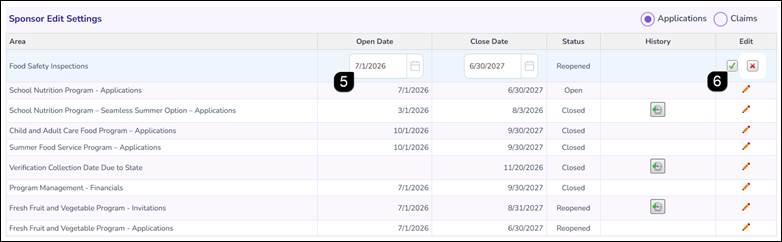
- Adjust the Open Date and Close Date as needed.
Note: Sponsors will only have edit access to the specified area if the current date falls within this range.
- Click the Green Checkmark to save your changes.
Reviewing Date Change History
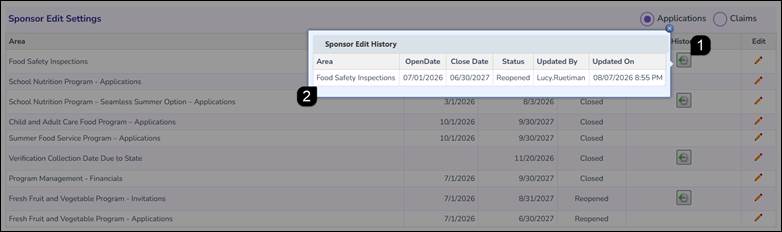
- Click the Clock icon in the History column.
Note: The clock icon only appears if the dates for that record have been modified previously.
- Review the popup details to see a log of all historical date adjustments, including the user who made the change and the date of the update.
FAQs
Q: Why is a Sponsor unable to edit their application even though the current date is within the Open and Close dates?
A: Sponsor Edit Controls manages the global window for access. However, individual application statuses (such as Approved or Submitted) may still restrict a Sponsor from making changes until the State Agency requests edits.
Q: Can I set the Open Date to a date in the future?
A: Yes. Setting a future Open Date allows you to schedule when the window will become available to Sponsors in advance.
Q: Does the system prevent me from setting a Close Date that is earlier than the Open Date?
A: Yes, the system includes validation to ensure that the Close Date occurs after the Open Date.
Q: How do I know who changed the application or claim window date?
A: Click the Clock icon in the History column for that specific row. The resulting popup identifies the user account associated with every change.
Q: Will changing these dates impact applications that are already in "Approved" status?
A: No. Approved applications are typically locked regardless of the edit control dates. These dates primarily impact applications that are currently In Progress or those requiring amendments.