
Import
Purpose
This guide provides instructions for State Agency users to import second preceding year meal counts for SNP applications. This process ensures historical meal count data is available for use during the application approval workflow.
This function is primarily used during the first two years of system implementation to record historical data. Once the system contains two years of internal claim history, manual imports are no longer necessary.
Step-by-Step Instructions
Configuring the Import and Template Download
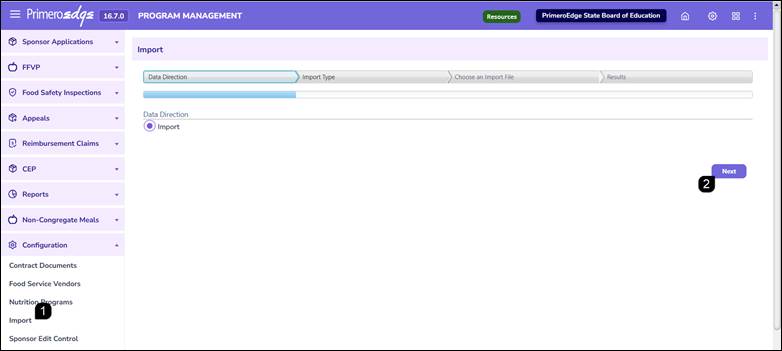
- Navigate to the Program Management module > Configuration > Import page.
- Select Import as the data direction and click Next.
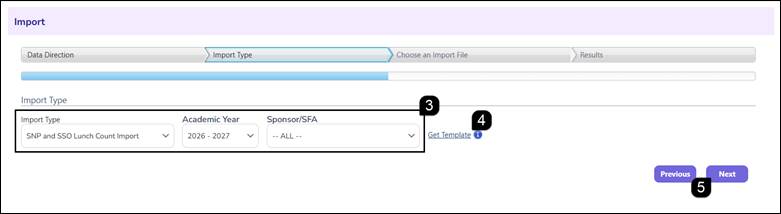
- Complete the following import criteria:
- Import Type: Select SNP and SSO Lunch Count Import.
- Academic Year: Select the year the application is being processed for.
- SFA: Select the SFA(s) for which counts are being added.
Note: SFAs only appear in the dropdown after their SNP application has been added/renewed for the Academic Year. This import should be completed before the SFA begins their application to ensure the counts are available for their use.
- Click the Get Template hyperlink to download the prepared spreadsheet to your computer.
- Click Next.
Preparing and Uploading the Data File
- Open the downloaded template and enter the Free Lunch Total, Reduced Lunch Total, Total Lunches, and Attendance Factor for the listed sites.
- Save the completed spreadsheet to your computer.

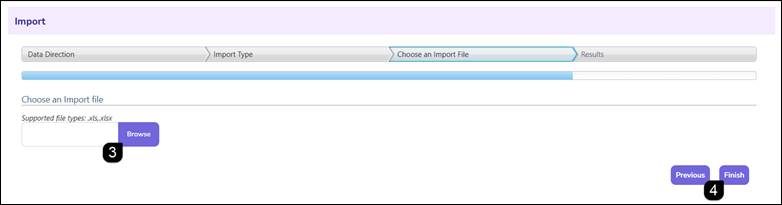
- Return to the system and click Browse.
- Select the saved file and click Finish.
Note: The import can be completed at any time up until the SFA application has reached Final Approved status.
Validating Import Results
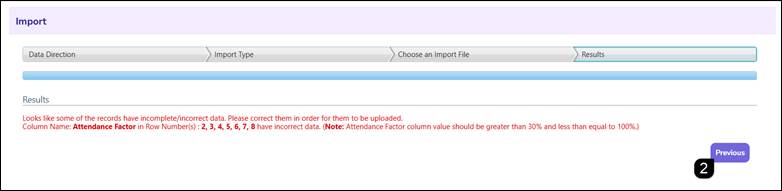
- Review the Results screen for a status message.
Success: A green message indicates the import is complete and valid.
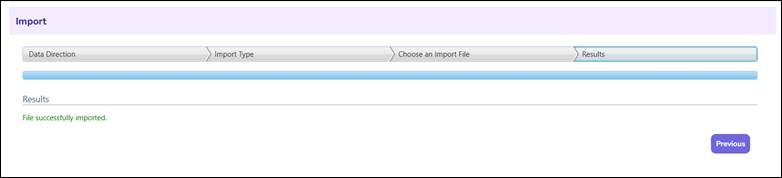
Error: A red message will identify specific columns and rows with missing or invalid information.
- If errors are present, click Previous, correct the data in your spreadsheet, and re-upload the file.
FAQs
Q: When is this import function typically used?
A: This function is primarily used during the first two years of system implementation to record historical data. Once the system contains two years of internal claim history, manual imports are no longer necessary.
Q: Can I still import meal counts if the SFA has already submitted their application?
A: Yes. The import can be performed at any time as long as the SFA application has not been officially approved by the State Agency.
Q: What should I do if the template shows the wrong sites for an SFA?
A: Ensure the correct Academic Year was selected in the initial step. If the sites are still incorrect, verify the applications have been added/renewed for the Academic year.
Q: Is the Attendance Factor a required field?
A: Yes. The import requires the Attendance Factor to be populated alongside the meal totals to ensure accurate application calculations.