
Regions & Statewide - Regions
Purpose
This guide walks through the process for creating, managing, and associating Regions and Statewide-Regions within the system. This ensures that Districts and Sites are correctly organized to support various functionalities within the Procurement & Food Distribution modules.
Step-by-Step Instructions
Creating New Regions
- Navigate to the System module > Sites and Users > Regions and open the Regions tab.
- Click the Add New Region button.
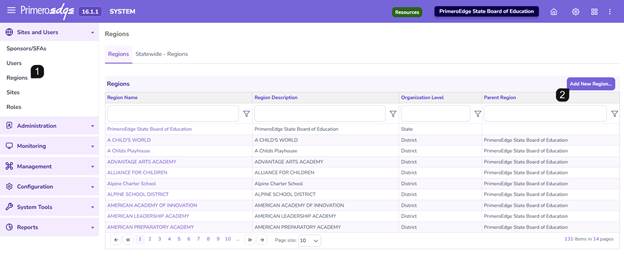
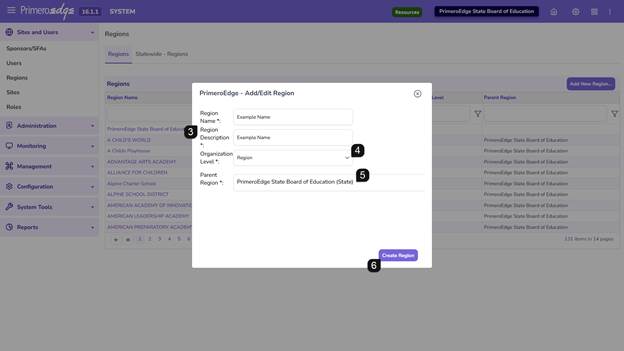
A pop-up will appear:
- Enter the Region Name and a Description (Note: These fields can contain the same text).
- Set the Organization Level dropdown to Region.
- Set the Parent Region dropdown to State Agency.
- Click Create Region.
Repeat these steps for every region required by your organization.
Associating Districts and Sites to Regions
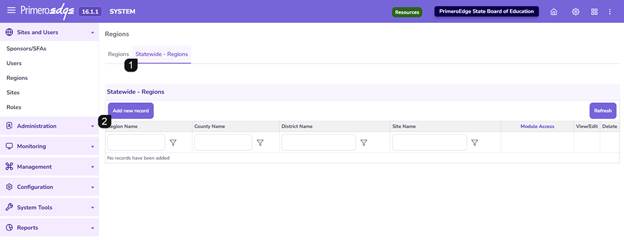
- Navigate to the Statewide – Regions tab.
- Click Add new record.
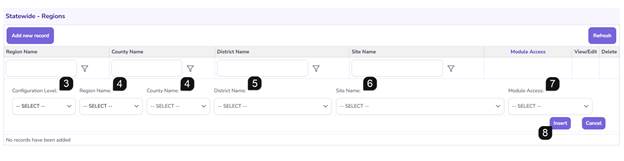
- Select the desired Configuration level: Choose either Counties or Regions based on your organizational structure.
- Select the specific Region Name OR County Name from the list depending on Configuration Level chosen.
- Choose the applicable Districts to be linked to this grouping.
- Review the Sites list; the system will automatically check sites for the selected districts. Manually adjust these checkboxes if specific sites need to be associated with different regions.
- Choose one of more modules from the dropdown for the Module Access.
- Click Insert to finalize the association. Repeat these steps for every region required by your organization.
Maintaining and Modifying Regions
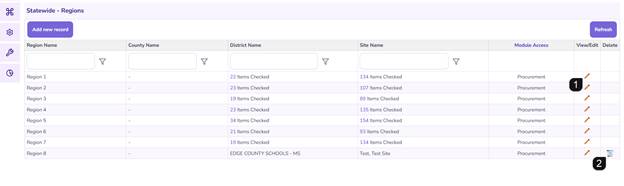
- To Edit: Locate the region in the list and click the pencil icon. Update the necessary fields and save changes.
- To Delete: Locate the region and click the trashcan icon.
- Note: Deletion is only permitted for regional groupings that have not yet been utilized in downstream module functions.
Additional Notes
- System Requirement: For the District Orders and Order Guide features to function, all Districts and their associated Sites must be linked to a relevant Region.
- Configuration Flexibility: Users can choose to organize district sites within different regions depending on needs.
FAQs
- Q: Why can't I delete a specific region?
- A: If a region or grouping is already being used in module functionality (like active orders or guides), the system prevents deletion to maintain data integrity.
- Q: Do I have to enter different text for Name and Description?
- A: No, the system allows the Region Name and Description to be identical.