
Bill of Lading
Purpose
This guide walks through the process for searching and reviewing Bill of Lading (BOL) records within the Food Distribution module. Bill of Lading records are populated through the Bill of Lading import process and provide shipment information associated with USDA Foods orders.
Step-by-Step Instructions
Searching for Bill of Lading Records
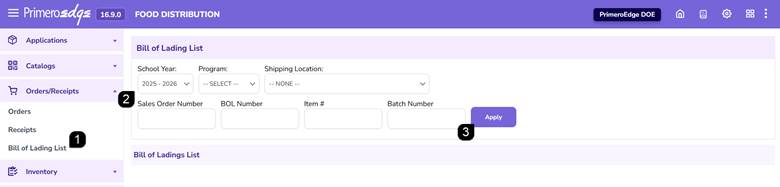
- Navigate to the Food Distribution module > Orders/Receipts > Bill of Lading page.
- Select the School Year, Program and Shipping Location. Enter any available Sales Order Number, BOL Number, Item Number, or Batch Number, if available.
- Click Apply to display matching Bill of Lading records.
Reviewing Bill of Lading Results
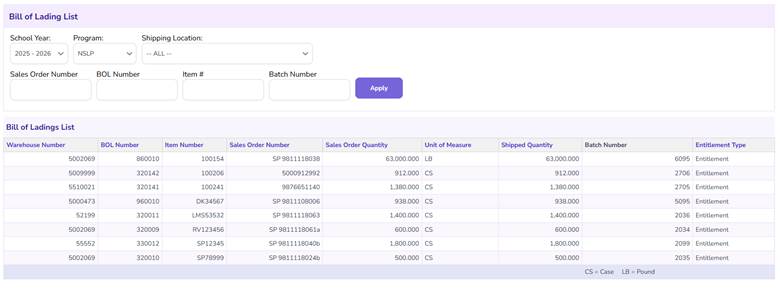
- Review the Bill of Lading information displayed within the results table.
Note: Bill of Lading information is populated through the Bill of Lading import process.
FAQs
Q: Why are no records displayed?
A: Verify that the selected search criteria match existing imported Bill of Lading records and click Apply.
Q: Where does Bill of Lading information come from?
A: Bill of Lading information is imported into the system through the Bill of Lading import process found in Food Distribution > Configuration > Import/Export.