
Advertise USDA Foods
Purpose
This guide walks through the process for advertising available USDA Foods inventory to Recipient Agencies (RAs) within the Food Distribution module. Advertisements allow State Agencies to make available inventory quantities visible to selected Recipient Agencies for a specified period of time to allow Recipient Agencies to make requests for quantities.
Once created, advertisements are viewed and managed in the Advertisement List function.
Step-by-Step Instructions
Creating an Advertisement
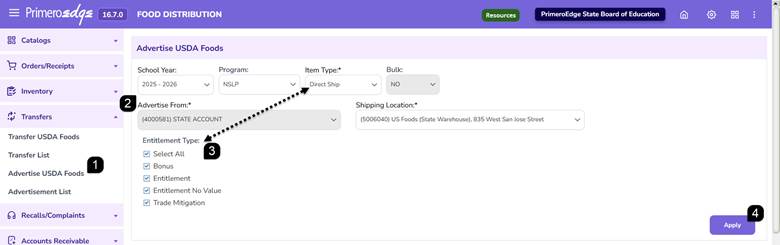
- Navigate to the Food Distribution module > Transfers > Advertise USDA Foods page.
- Select the applicable School Year, Program, Item Type, and Shipping Location.
Note: The Bulk dropdown will auto populate based on the Item Type selected and the Advertise From dropdown will default to the State Account. Advertisements can only be created for Sales Order quantities allocated to the State account.
- If advertising Direct Ship, non-bulk inventory, select the applicable Entitlement Type(s).
- Click Apply to display available inventory items.
Selecting Advertisement Quantities
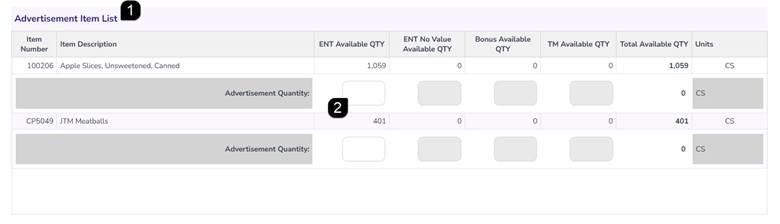
- Review the items displayed in the Advertisement Item List.
- Enter the Advertisement Quantity to be advertised for the desired inventory items.
Note: Advertisement quantities can only be entered for inventory types with quantities greater than zero.
Note: Direct Ship items will be listed and available by selected Entitlement Type. Processed Goods items will be listed by available quantity.
Posting an Advertisement
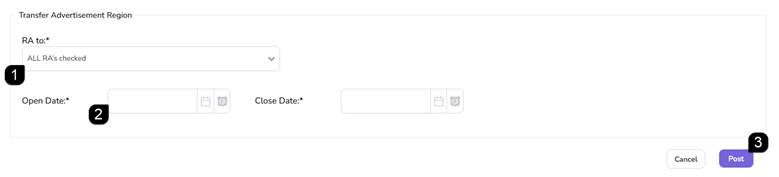
- Select the Recipient Agencies that should receive the advertisement.
Note: Advertisements may be offered to one, multiple, or all Recipient Agencies.
- Enter the advertisement Open Date/Time and Close Date/Time.
Note: The Open and Close Dates must fall within the selected School Year and cannot be in the past. The Close Date/Time must be later than the Open Date/Time.
- Click Post to publish the advertisement.
- Review the green success message containing the advertisement number.
Note: Advertisement numbers beginning with "P" indicate Processed Goods advertisements, while advertisement numbers beginning with "D" indicate Direct Ship advertisements.

FAQs
Q: Who can advertisements be created for?
A: Advertisements are created from inventory allocated to the State account and may be offered to one, multiple, or all Recipient Agencies.
Q: Do I have to select an Entitlement Type?
A: Yes. When advertising non-bulk inventory, one or more Entitlement Types must be selected.
Q: Why can't I enter an advertisement quantity?
A: Advertisement quantities can only be entered for inventory types with quantities greater than zero.
Q: What happens after I click Post?
A: A success message is displayed and the system returns you to the Advertise USDA Foods page.