
Delivery Ordering: Modify Delivery Orders
Purpose
This guide walks through how to manage existing delivery orders by searching, updating quantities, or cancelling orders to maintain accurate distribution records and inventory levels. The Modify Delivery Orders process to allow the State Agency to make edits to existing Delivery Orders in any Status, up until delivery occurs.
Delivery Order Status | Definition |
Cancelled | Delivery Order is cancelled by the State Agency. |
Closed | Delivery Order is no longer open for RA delivery site delivery order modification requests. |
Discrepancy Closed | State Agency completed and resolved a reported RA Delivery Order Discrepancy. |
Discrepancy Edits Requested | State Agency has requested RA to complete Edits for reported RA Delivery Discrepancy. |
Discrepancy In Review | State Agency is reviewing the RA-submitted Delivery Discrepancy. |
Discrepancy Reported | RA has reported a Delivery Order Discrepancy. |
Finalized Order | State Agency has processed the final RA Delivery Order requests to be delivered by the Distributor/Warehouse to the RAs. |
In Progress | RA has begun but has not completed the Delivery Site Ordering modification requests. |
Open | RAs are allowed to complete delivery site delivery order modification requests. |
Pending Review | A reported RA Delivery Discrepancy is waiting to be viewed/processed by the State Agency. |
Step-by-Step Instructions
Accessing Modify Delivery Orders
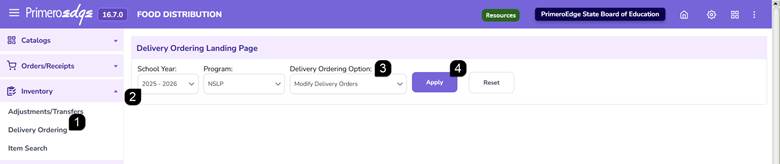
- Navigate to the Food Distribution module > Inventory > Delivery Ordering page.
- Select the School Year and Program.
- Select Modify Delivery Orders.
- Click Apply.
Filtering Delivery Orders
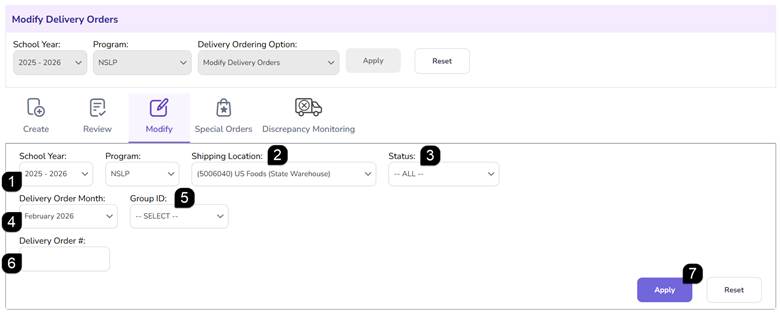
- Verify the School Year and Program.
- Select the Shipping Location from the dropdown menu.
- Select a Status from the dropdown or leave as All selected.
- Select the Delivery Order Month.
- Select the Group ID.
- Optionally, enter the Delivery Order #.
- Click Apply to view the Modify Orders List table.
Review the Modify Orders List
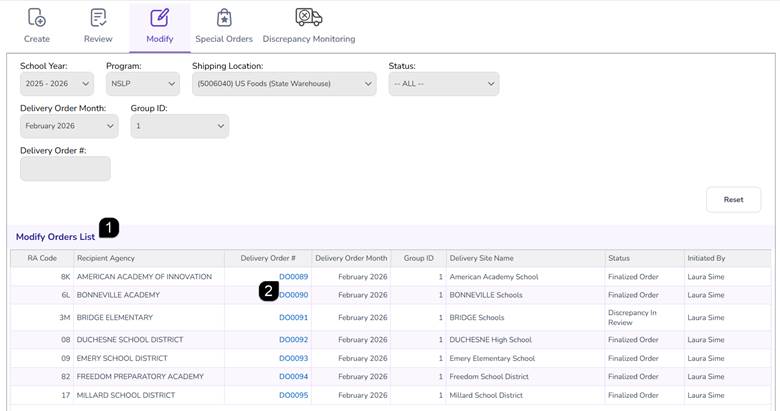
- View the Modify Orders List
- Click the Delivery Order # hyperlink to open the order details.
Modifying Order Quantities
- Open the RA Delivery Discrepancy Reporting page by clicking the Delivery Order # hyperlink.
- Review the Order Details to see the order quantity details including any adjustments.
- Review the Order Details Transaction History at the bottom of the page to list of changes.
- Click Edit to make changes to the order.
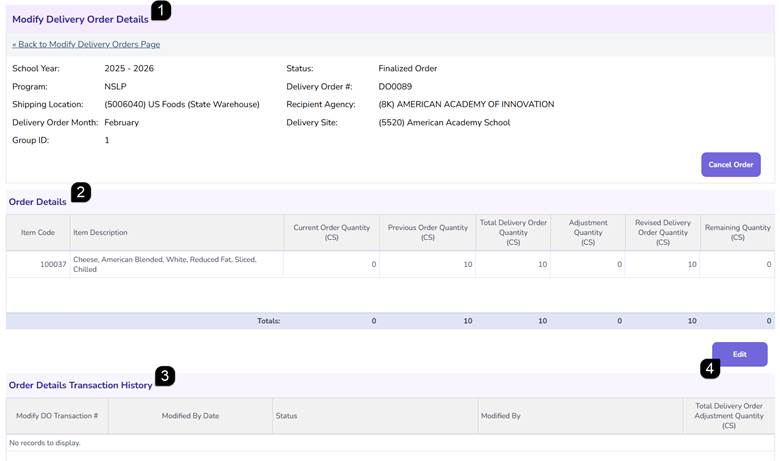
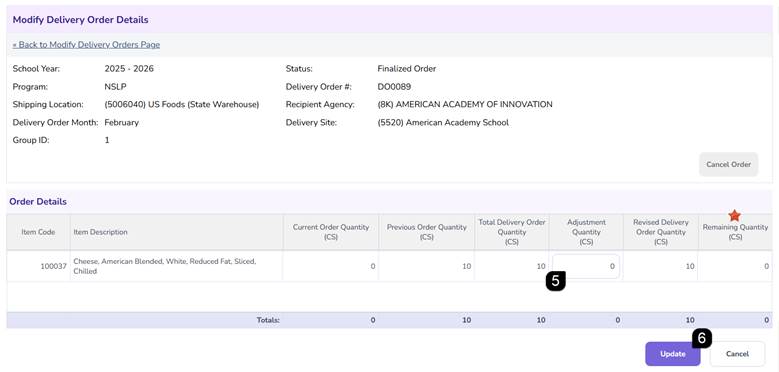
- Use the Adjustment Quantity column to make any changes to the Revised Delivery Order Quantity.
Note: If no adjustments were previously made, you can only take quantity away using a negative number. If previous adjustments were made and there is a Remaining Quantity, you can add back in what was taken away using a positive number or take quantity away using a negative number.
- Click Update to save the changes. A success message will appear, and the transaction will be logged in the Order Details Transaction History.
Cancelling a Delivery Order
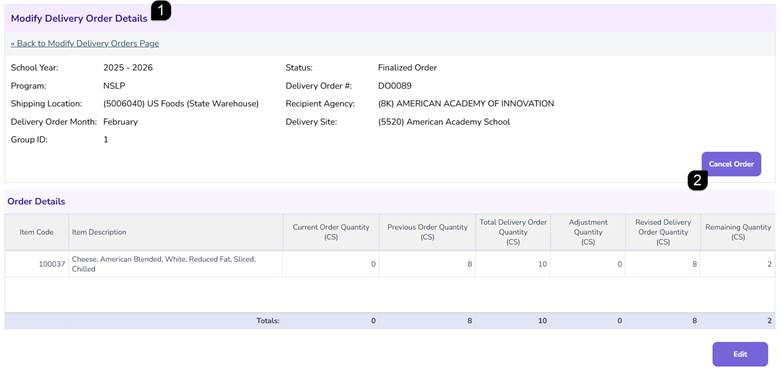
- Open the Modify Delivery Order Details page by clicking the Delivery Order # hyperlink.
- Click the Cancel Order button.
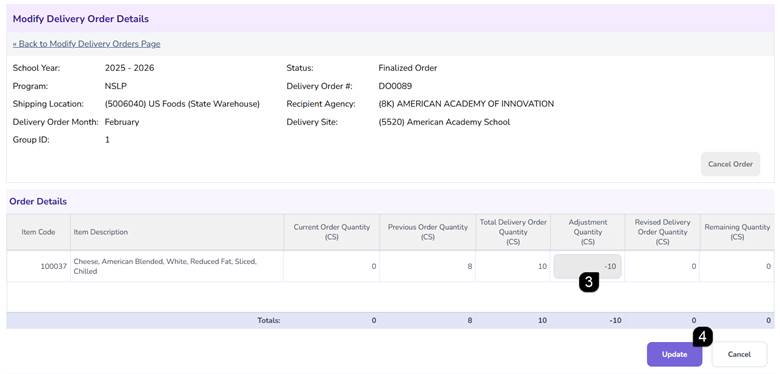
- The system will change the Adjustment Quantities to remove the items.
- Click Update Order.
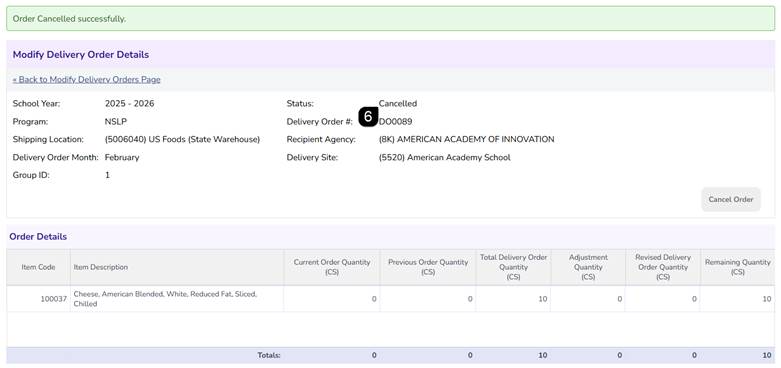
- Confirm that the status has changed to Cancelled.
Note: The system will automatically return the removed quantities to your available Order Quantity, allowing them to be allocated to a future order.
Re-Post Delivery Orders
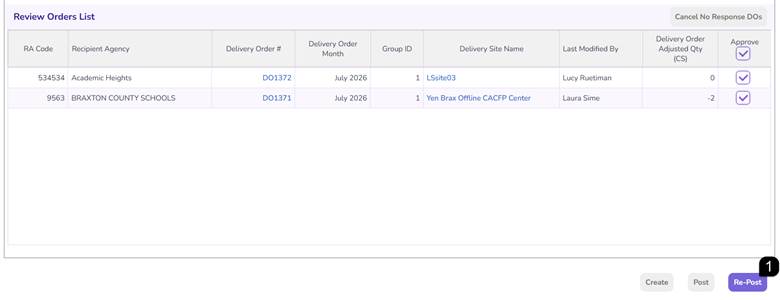
Finalized Delivery Orders that are edited or cancelled in the Modify Delivery Order process will be available in the Review Orders List so the edits can be Re-Posted for Shipping Locations and Delivery Order Reports can be updated.
- Go to Delivery Ordering > Review Orders > Review Orders list, click Re-Post to complete the process and ensure changes are reflected throughout the system.
FAQs
Q: What happens to the inventory when an order is cancelled?
A: The system automatically adjusts inventory quantities, returning the cancelled items to the available pool for future delivery orders.
Q: Can the State Agency modify an order that is in "Finalized" status?
A: Yes, the State Agency can search for and select "Finalized Order" in the Status dropdown to locate and modify or cancel orders that have already been finalized.
Q: How do I track who made changes to a delivery order?
A: All modifications are logged in the Transaction History table within the individual Delivery Order record, showing the transaction number, status, and modifications.