
Item Search
Purpose
This guide walks through the process for accessing and reviewing inventory data by shipping location, ensuring consistent retrieval of on-hand, on-hold, on-order, and received USDA food item stock information for a Recipient Agency.
Refer to the following inventory type definitions as needed:
Inventory Type | Definition |
Received Quantity | Amount received, based on the receipt quantity. |
On Order Quantity | Amount ordered for delivery to RA Delivery Sites. |
On Hand Quantity | Amount physically in-storage at the Distributor/Warehouse/ Shipping Location. |
On Hold Quantity | Amount removed from shipping to RAs. Typically used for damage/recall issues at the Distributor/Warehouse/Shipping Location. |
Available Quantity | Receipt Quantity minus On Order Quantity, On Hold Quantity, and Surplus Quantity (State Account only). |
Step-by-Step Instructions
Searching for Inventory Items
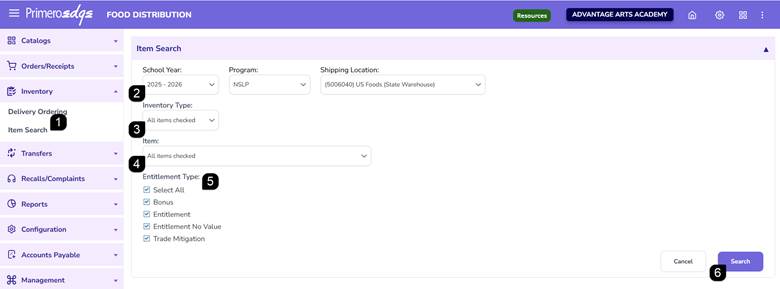
- Navigate to the Food Distribution module > Inventory > Item Search page.
- Select the School Year, Program, and Shipping Location.
- Select the Inventory Type: Choose from On Hand, On Hold, On Order, Received, or Surplus.
- Select the Item: Choose one, multiple or all items.
- Select the Entitlement Type: All are automatically selected.
- Click the Search button to execute the query.
Reviewing Inventory
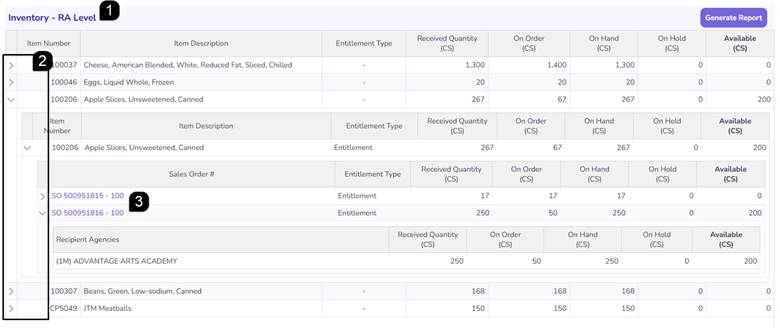
- Review the inventory quantities displayed within the Inventory – RA Level table.
- Click the Arrows to expand or collapse additional inventory details including the Sales Orders.
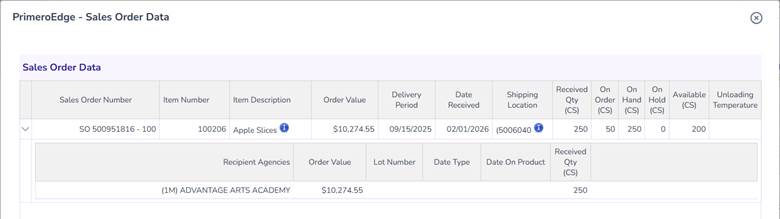
- Click any Sales Order hyperlink to open the detailed pop-up window displaying order value, delivery period, date received, quantities (received, on order, on hand, on hold, available), and lot information.
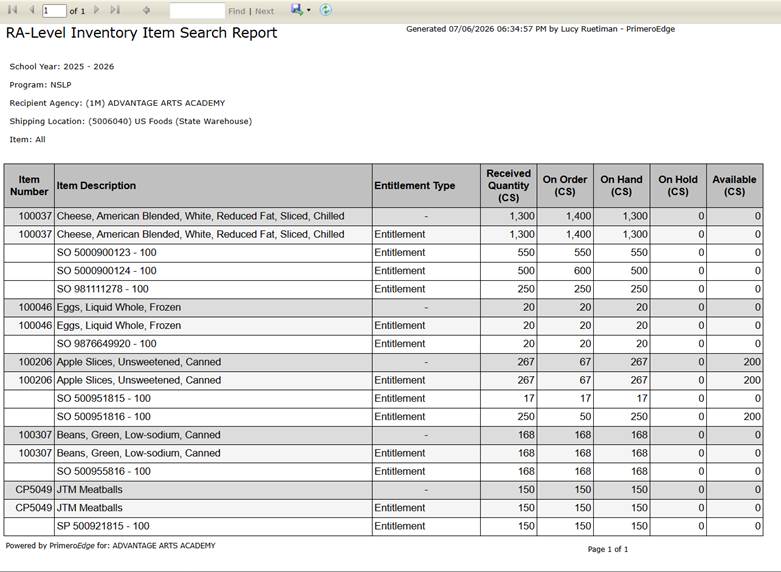
- Return to the main inventory table and click Generate Report to produce a printable version of the displayed data.

FAQs
Q: Can multiple inventory types be selected simultaneously?
A: Yes. Any combination of On Hand, On Hold, On Order, Received, and Surplus may be chosen.
Q: Is the generated report printable?
A: Yes. The report displays all table data and can be saved in alternative formats via the floppy disk icon for printing.