
Transfer List
Purpose
This guide walks Recipient Agencies (RAs) through searching for existing transfers, understanding transfer statuses, and completing the acknowledgement process for RA-to-RA transfers.
Status | Definition |
Acknowledged | RA has reviewed/accepted transfer of the USDA Foods Item. |
Cancelled | State Agency has cancelled the Transfer request. |
Complete | Transfer request process is finalized. |
Pending Acknowledgement | Transfer request is waiting for RA review/acceptance. |
Submitted | RA has submitted a Transfer request for State Agency review/approval. |
Step-by-Step Instructions
Searching and Filtering Transfers
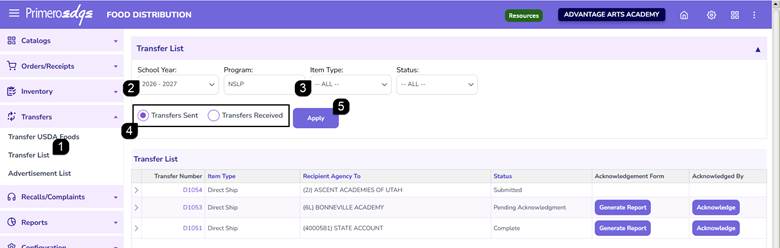
- Navigate to the Food Distribution module > Transfers > Transfer List page.
- Select the School Year and Program.
- Use optional filters such as Item Type and Status.
- Select Transfer Sent or Received.
- Click Apply.
Reviewing Transfer Results
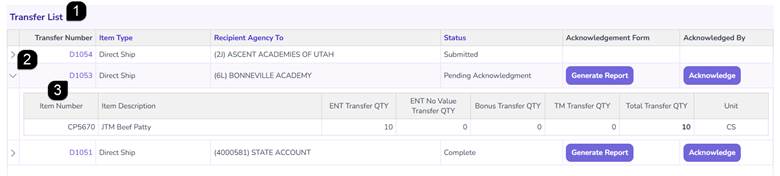
- Review the results in the Transfer List grid.
Note: Transfer numbers beginning with P indicate Processed Goods; those beginning with D indicate Direct Ship items.
- Click the Arrows to expand and collapse details.
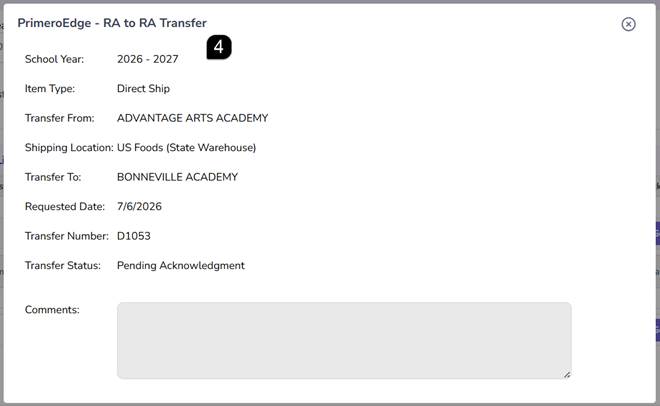
- Select the Transfer Number hyperlink to open the full detail pop-up.
- Review the shipping location, transfer dates, and any comments submitted with the request.
Authorizing and Acknowledging Transfers
For transfers between two RAs, once the transfer has been approved by the State Agency, both the sending and receiving agencies must acknowledge the transfer before the State Agency can finalize it.
- Locate a transfer with the status Pending Acknowledgement.
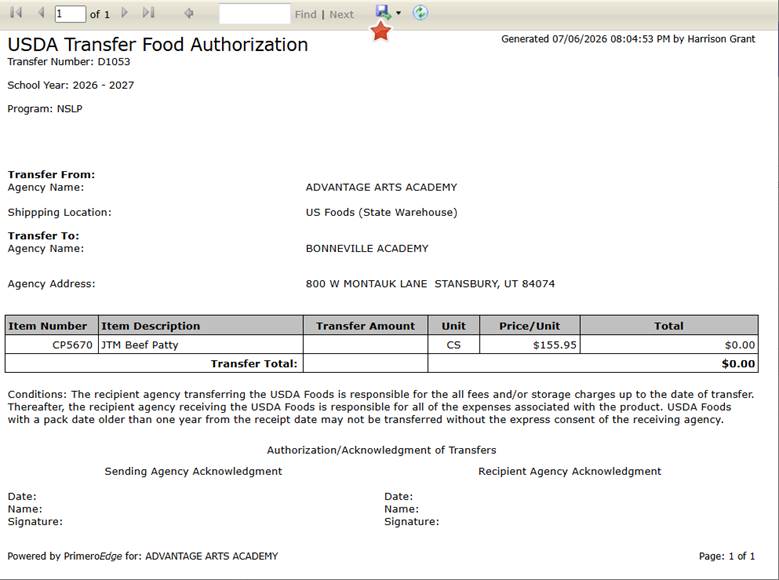
- Click Generate Report to open the USDA Transfer Food Authorization report.
Note: You can save this report for your records by clicking the Blue Floppy Disk icon and selecting your preferred format.
- Review the quantities and agency details on the report.

- Once verified, click Acknowledge within the system.
Note: This action records your name and the timestamp, updating the status to Acknowledged and notifying the State Agency.

- Once both parties have acknowledged, the State Agency will complete the process, and the status will update to Complete.

FAQs
Q: What is the difference between transfer numbers starting with "P" vs "D"?
A: "P" indicates the transfer contains Processed Goods, while "D" indicates Direct Ship items.
Q: Why don't I see the Acknowledge button on all transfers?
A: The Acknowledge button only appears when the State Agency has reviewed the transfer and moved it to Pending Acknowledgement status.
Q: Can I cancel a transfer from the Transfer List?
A: Once a transfer is submitted, any changes or cancellations must be coordinated with the State Agency. Cancelled transfers will appear in your list with the Cancelled status for historical tracking.
Q: How do I know if the other agency has acknowledged the transfer?
A: You can view the USDA Transfer Food Authorization report. The bottom portion will display the signature/timestamp of the Sending or Receiving RA once they have clicked the Acknowledge button.
Q: Does acknowledging a transfer update my inventory immediately?
A: The inventory is officially adjusted once the State Agency reviews the acknowledgements and moves the transfer to Complete status.